Few things derail global meetings faster than a misread time. Is 0800 morning in your city, or evening in theirs? A quick military time converter removes half of the confusion. The other half comes from missing labels. This guide shows you how to convert military time fast and schedule with confidence. You will get simple rules, quick examples, and a pre-send checklist. Let's make every meeting invite clear for remote teams everywhere.
Global Meeting Times in 24-Hour Format: A Quick Guide
The 24-hour time format uses four digits, from 0000 to 2359, with no AM or PM to misread. That clarity helps international teams agree on one moment. Hours run 00 to 23 and minutes 00 to 59, so 1545 means 15 hours and 45 minutes. Once the pattern clicks, scheduling becomes a short mental task. Practise with three or four examples and it sticks.
Convert Military Time Fast With the Add-12 Rule
Use one rule in both directions. Going to military time, add 12 to PM hours: 3:45 PM becomes 1545. Going back, subtract 12 from the hour and add PM: 1730 becomes 5:30 PM. For 0000 to 1159, simply drop any leading zero and add AM, so 0905 becomes 9:05 AM. That is your entire toolkit for quick time conversion.
Time Zones and Military Time: Convert in 3 Steps
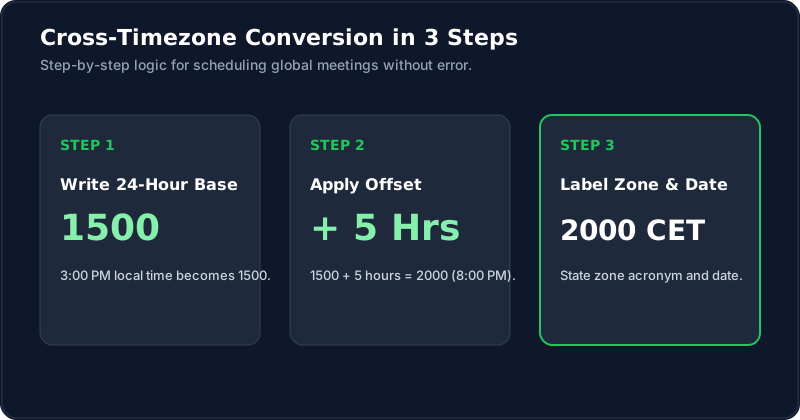
Step one: write the meeting time in 24-hour form. Step two: add or subtract the time zone difference. Step three: label the result clearly. If a city is five hours ahead of UTC, then 1500 UTC becomes 2000 there. If the total reaches 2400 or more, subtract 24 and move to the next day. This method powers cross-border scheduling.
Which Time Zone Is Your Meeting In? Always Label It
A bare time is an invitation to confusion. Write 1500 UTC, 1500 EST, or 1500 local, never just 1500. Clear time labels also save teammates from guessing whether daylight changes apply. Add the date too, because a meeting that is Tuesday evening for you may be Wednesday morning for someone else.
Free Time Zone Converters for Global Meetings
Free tools speed things up. ClockIt's free military time converter accepts 1830, 18:30, or 6:30 pm, and its swap button converter reverses the direction. Pair it with any world clock site that lists several cities at once. Look for tools that are quick, mobile-friendly, and display both 12-hour and 24-hour results.
Quick Military Time Conversions
| Military time | Standard time | Quick rule |
|---|---|---|
| 0905 | 9:05 AM | Drop the zero, add AM |
| 1230 | 12:30 PM | Noon hour stays 12 |
| 1545 | 3:45 PM | Subtract 12, add PM |
| 1830 | 6:30 PM | Subtract 12, add PM |
| 2330 | 11:30 PM | Subtract 12, add PM |
UTC, GMT, and Zulu: Which One Should You Schedule In?
All three point to the same reference time. GMT and UTC are often used interchangeably, and Zulu simply adds a Z to a four-digit military time, as in 1500Z. For global meetings, UTC is a neutral choice because it avoids favouring one country. State it clearly, then add each region's local equivalent beside it. Keep one reference time in every meeting series for consistency.
Meeting Invites Without Confusion: AM/PM or 24-Hour?
Use both when guests span countries. Write 3:00 PM (1500) UTC, and no one has to translate. Some regions prefer 12-hour AM/PM time, while others read 24-hour naturally. Showing both respects everyone's habits. It is a small effort that prevents long email chains about who was late.
How to Convert 1500 Local Time to Another Time Zone
Start with 1500, which is 3:00 PM. If the other city is four hours ahead, add four to get 1900, or 7:00 PM. If it is eight hours behind, subtract eight to get 0700, or 7:00 AM. If it is ten hours ahead, 1500 plus ten is 2500, minus 24 gives 0100 the next day. Remember: 2400 equals 0000 next day.
Common Scheduling Mistakes With Remote Teams
Typical errors include forgetting daylight changes and falling into 12 PM noon confusion, where 12 PM is mistaken for midnight. Another is assuming 2400 and 0000 appear on different dates. Some people skip the time zone entirely. These slips hurt scheduling accuracy and waste everyone's time, so build habits that catch them early on.
A Quick Checklist Before You Send Any Global Meeting Invite
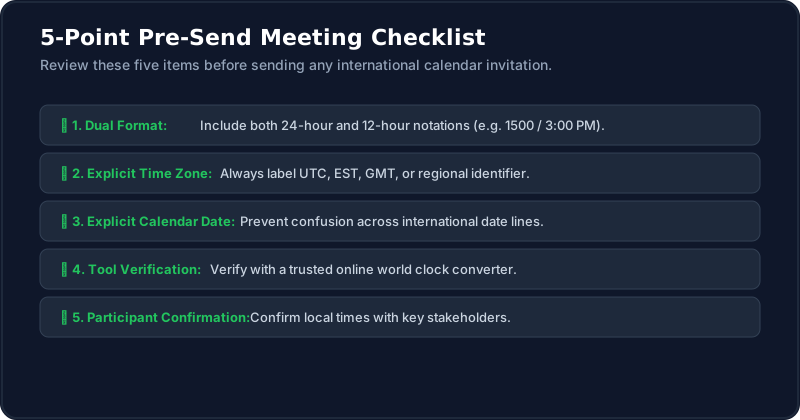
Before you hit send, check five things. Is the time in 24-hour form and in 12-hour form? Is the time zone labelled? Is the date included? Did you test the conversion with an online time clock or converter? Have invitees confirmed their local time? Five seconds of checking beats five minutes of confusion.
Conclusion
Global scheduling becomes easy when you follow a few simple, steady habits. Learn the add-and-subtract twelve rule, label every time zone, and include the date with each invite. Show both 24-hour and AM/PM times so nobody has to guess. Use a trusted online converter to double-check the final result before sending. With these habits, remote teams meet on time, every single time, and nobody wakes up for the wrong call.